
01
The same terminal as before
Not another chat window. Accounts and subscriptions keep working. Claude Code and Codex still run in their own terminals.
macOS · The local AI dev workbench
Claude Code and Codex stay in their own terminals — not another chat window. Click to jump back, then edit files and review Git beside them.
Free and open source · macOS only
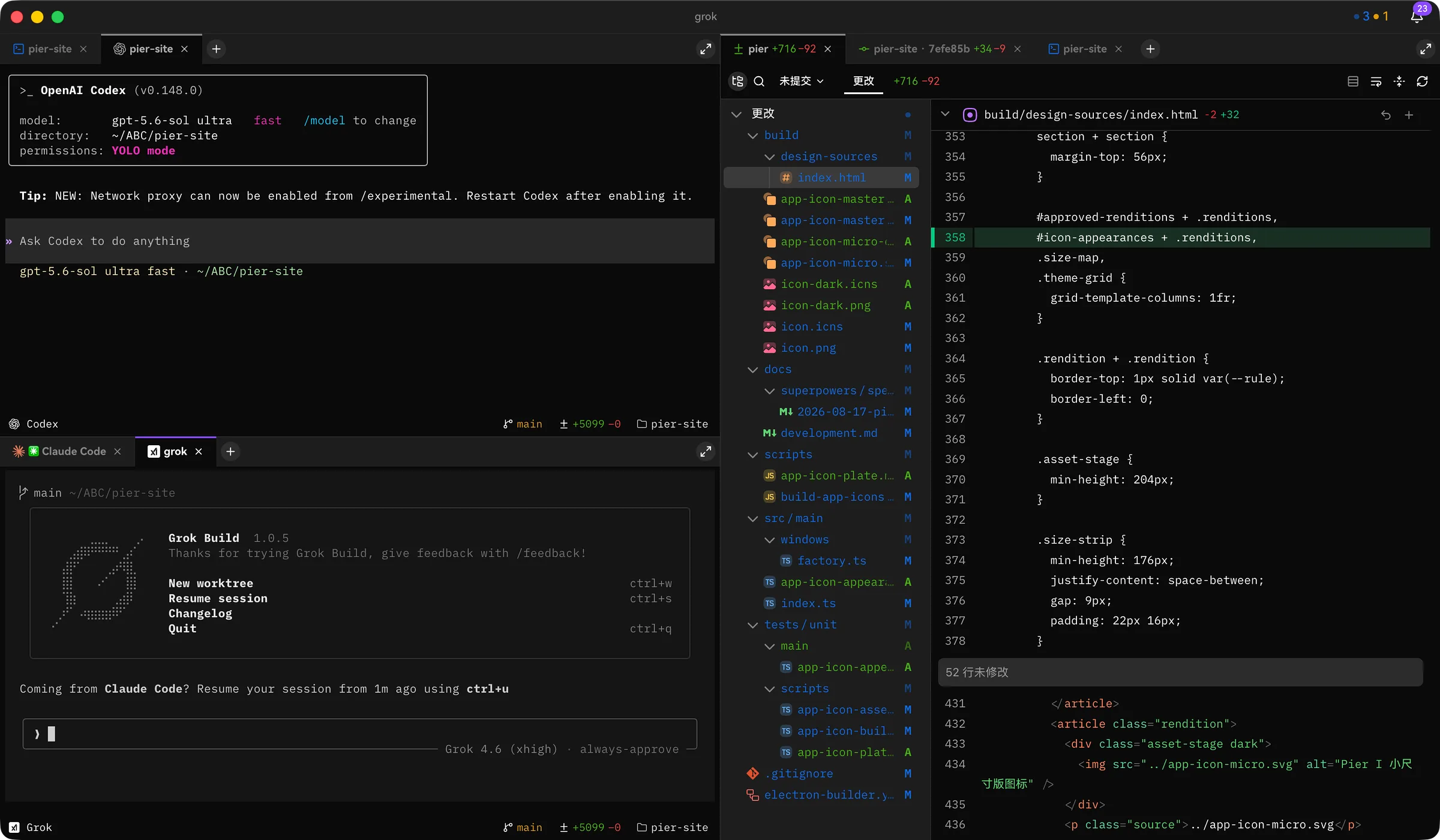
These command lines run as they already do
01Why Pier
Claude Code stays in its original terminal. Who is running, who is asking, who errored — click and go back. Edit files and review Git right beside it.
Not another chat window. Accounts and subscriptions keep working. Claude Code and Codex still run in their own terminals.
Running, needs you, and error sessions in one place. Click to jump back — no hunting through tabs.
Open files and edit. Stage by file or hunk, commit, push. A one-line change or a Git review doesn't need another editor.
02Core workflow
Start Claude Code, Codex, or another command line in a project or a separate directory (a Git worktree).
When several sessions run at once, see who is running, who is waiting, and who errored.
Click that session, return to its original terminal, confirm or keep writing.
Leave the terminal running. Open a file, read the diff, then commit.
03Performance & feel
How fast the terminal can be comes from the engine. How it feels comes from how you search and jump back. Pier works on both.
Native rendering
Terminals use the Ghostty engine with GPU rendering. Heavy output still scrolls smoothly.
Sessions outlive the UI
After a refresh or a restart, running terminals stay connected.
Polished for command-line UIs
Whether the cursor shows, and where typing goes — the details that make Claude Code and Codex usable — Pier fixes in the engine.
Native macOS terminal · Ghostty
Command palette
Quick Open file
New terminal
Next session that needs you
Split pane
Find in panel
The command palette ranks by recent use and supports fuzzy search. Open files, stage, commit, and switch branches from there. Jump to a session that needs you with one key. Search and remap shortcuts in Settings.
04Core features
A native terminal with GPU rendering. Run shells and CLIs like Claude Code and Codex in a project or a separate directory. Running sessions stay usable after a UI refresh.
See running, needs you, and error sessions in one place — click any of them to jump back to its terminal.
Give each task its own project directory (a Git worktree) so edits don't collide.
Open and edit project files. Review diffs, stage by file or hunk; commit, push, switch branches, and stash from the command palette.
Canvas is a page saved with the project. You can open it now to write notes and arrange content. Boards and run graphs built from terminals and status are still being built.
Arrange terminals, the editor, and changes with tabs, splits, and floating panels. Layouts save automatically and restore on reopen.
05Local CLI & plugins
Use pier to open projects, find windows and panels, send text or keys to a terminal, and query sessions and separate directories. It only talks to the Pier running on this Mac — it is not a remote service.
Read the CLI manualBuilt-in plugins and official signed, verified plugins work today. Third-party sources are not open yet.
Read the plugin docs# open the current project in Pier
❯pier . --json
# query windows, panels, and session status
❯pier status --json
# list panels in the current layout
❯pier panels list --json
❯
Product boundaries
Not a chat window, and no built-in task list or auto-dispatch.
The app itself has no task list and does not assign work for you. Boards and run graphs belong on the canvas, using terminals and status — that part is still being built.
Claude Code and Codex stay in their own terminals. Accounts, subscriptions, and shortcuts keep working.
Leave, and your command lines, accounts, and repos keep working.
Download
Free and open source. Pick a project folder, open the command lines you already use, and edit files or review Git beside them.
The desktop app currently supports macOS only (Apple Silicon / Intel).
At launch, if the install directory is writable, Pier tries to put the pier command on your PATH. If the command isn't found, install it in Settings → Terminal.
❯git clone https://github.com/runloom/pier.git
❯cd pier
❯pnpm bootstrap
❯pnpm dev
Requires Node ^24.15, pnpm ≥11.12, Xcode Command Line Tools, Homebrew, and zig@0.15. For an existing Git worktree, run pnpm setup:worktree first.
FAQ
People who already run Claude Code, Codex, or OpenCode in a terminal — especially more than one at a time, or who want to edit files and review Git without jumping to another editor. One session is fine too; keep the terminal, editing, and Git here. If you mostly write code in Cursor chat, this isn't the tool for you.
Cursor puts command lines in a chat window. Pier leaves them in their original terminals, shows who is waiting, and lets you edit files and review Git beside them.
herdr runs inside the terminal you already use: it splits panes and can show who is waiting. cmux is a terminal. tmux only splits panes. Pier is a desktop window, with file editing and Git beside them.
Orca ships tasks and scheduling. Pier does not. Boards and run graphs belong on the canvas — that part is still being built.
Daily edits, diffs, and commits can happen in Pier. If you need a particular editor extension, keep using that editor.
No. These command lines run in their own terminals, so your accounts, subscriptions, and configuration keep working as-is.
The desktop app currently supports macOS only, with Apple Silicon and Intel builds.
Everything stays local: preferences and layouts are files on this Mac, terminal output is written locally, code changes are read live from Git, and secrets go to the macOS Keychain.